OffLingua / iPhone
OffLingua is for the traveller who wants a dedicated translator ready in their pocket: text and photos processed on the iPhone, a one-time purchase and no separate account to set up.
Download on theApp StoreThe useful part starts before you leave
Install OffLingua while you have a connection and let the translation model finish downloading. The app needs space for that model as well as the small initial installation. Keep it open during setup, and do this somewhere you can wait comfortably rather than at the boarding gate.
Once the model is ready, text and photo translation run on the device. Try turning connectivity off and translating a sentence you know. Then try a photograph. A quiet five-minute rehearsal tells you more about your own phone than a promise on a download button.
Bring the message into one clear view
A host sends check-in instructions. A small rental company replies in its own language. Your friend forwards a notice about a changed train platform. Paste the words into OffLingua and choose the source and destination languages. The original and the translated text are visible together.
Read the whole result before copying it into your reply. Street names, booking references and times deserve a second look: they often need to stay exactly as they were. If you are writing back, swap the translation direction and phrase the question simply. You do not need to turn a quick exchange into a formal letter.
A photograph keeps the words with the place
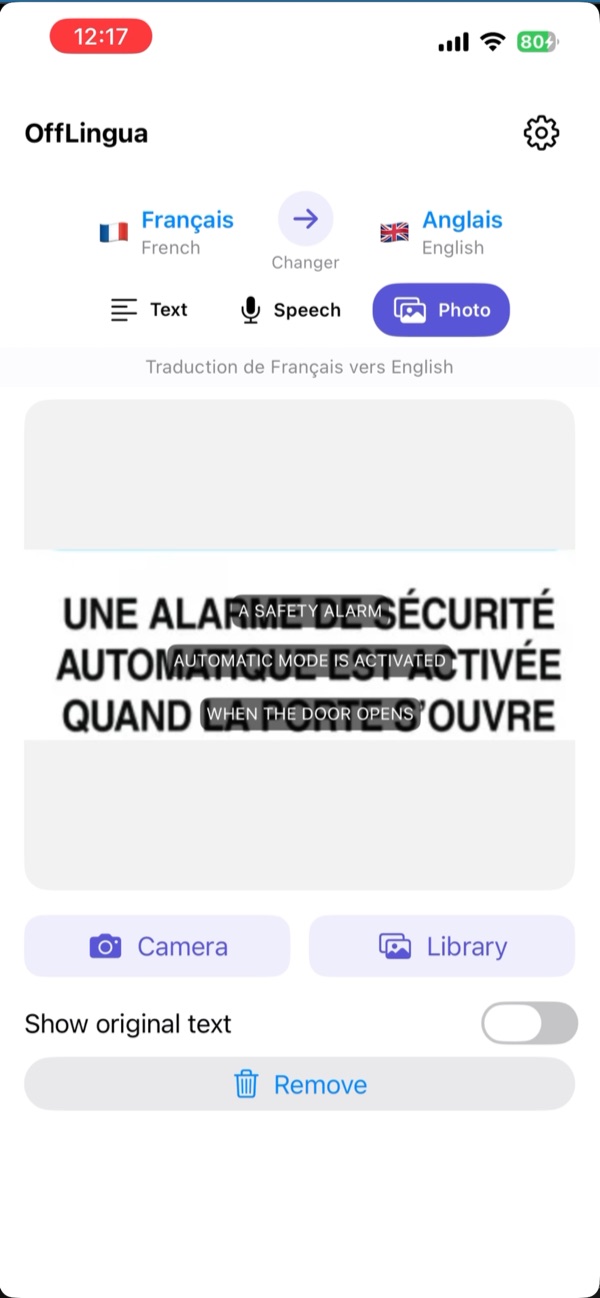
Printed words are part of travelling: a menu taped to the window, a sign by the ticket machine, a label on something you are about to buy. Use the camera or pick a photo from your library. OffLingua recognises the writing and overlays the translation on the image.
That layout helps you connect a translated line with the thing in front of you. Switch to the original when you want to show someone which part you mean. For a better result, take the photo straight on where possible, avoid glare, and move closer if the writing is small. You can retake a picture more easily than you can guess an unclear word.
Your translation model travels with you
On-device translation is a practical part of OffLingua. After setup, the text and photo translation process runs on your iPhone rather than waiting for a translation server. You can use those modes when a connection is unavailable or when you prefer to keep that translation work on the device.
The first model download still uses the internet. App Store installation and purchases also depend on Apple. Voice recognition is another step with its own requirements. These distinctions matter because they tell you what is ready when you open the app in a different place, with a different connection.
When speaking is easier, know what is ready
OffLingua has a Speech mode with a live transcript. Speak your sentence, stop recording, and read the translated result. Listen can speak supported translations aloud. That is useful for a short question when typing would interrupt the exchange.
Apple Speech handles the recognition. On-device speech availability varies by language and iPhone; some combinations can use Apple’s servers. Test your chosen voice language with connectivity off before leaving. If that mode needs a connection, the downloaded text and photo workflows still give you a way to understand or ask.
Buy the app for the work you will actually do
OffLingua is a one-time App Store purchase, with no recurring OffLingua subscription and no separate account. The current app requires iOS 17 or later. Apple shows the regional price and device compatibility, so check the listing on the phone you intend to carry.
Think about a normal day away: two messages, a few notices, a question at a counter. These are concrete reasons to keep a dedicated translator within reach. Choose the languages you need, try a familiar passage and make the app part of your preparation. When an address needs checking or a menu catches your eye, you will already know where to start.
A little preparation before you go
- Finish the model download on a reliable connection.
- Try one typed passage and one readable photo with connectivity off.
- Test speech separately in your chosen language.
- Save original addresses and booking details somewhere easy to find.
OffLingua
Take the next conversation with you.
Find the app on the App Store. If you need a hand with setup, the OffLingua team is a message away.
App details
This guide is written by the OffLingua team. The App Store has the current offer and requirements; support and privacy explain model downloads and voice services.