OffLingua / iPhone
With OffLingua, the current app is a one-time purchase through Apple. There is no recurring OffLingua plan to manage and no separate OffLingua account between you and your first translation.
Download on theApp StoreA translator does not have to be a monthly decision
Perhaps you travel only a few times a year. Perhaps you read another language occasionally, help a relative with a message, or want to understand a label while shopping. A translation app can earn its place through these small, useful moments without becoming something you use every day.
OffLingua is purchased once through the App Store. Apple displays the price in your region and handles billing. You buy the current app and its capabilities; the purchase does not promise every future feature or compatibility with every future operating system. What matters is whether the app does the work you want on the phone you have.
Set it up once, then learn the few steps you need
After installation, let the model download on a reliable connection. Allow space for it and keep the app open until setup is complete. This download is what makes the text and photo translation path available without an internet connection.
Choose a language pair and translate a short passage. Next, try a photograph with readable writing. A message and a menu are enough to learn the basic flow. If you plan to use voice, give that its own test: Apple Speech supports on-device recognition for some language and device combinations, while others can need a connection.
For the messages that arrive between trips
The app is useful outside an airport too. A family message, a reply about an order or a paragraph you want to read can go into Text mode. Paste the content, choose the languages and read the translated result beside the original.
Copy the result when you want to use it elsewhere. If you are answering, switch the language direction and write in a direct, conversational way. Keep names and numbers easy to check. Translation is most helpful when it gives you enough understanding to continue the exchange and ask a follow-up when something is uncertain.
For words that come printed, not pasted
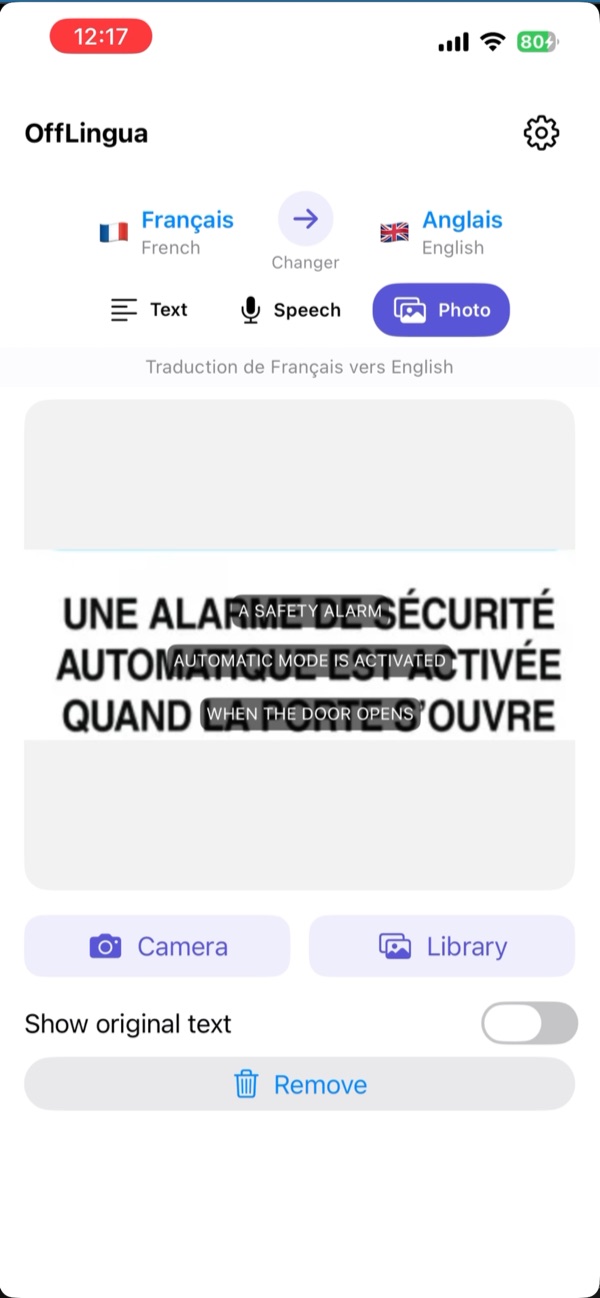
A product label, a museum notice or a restaurant menu cannot always be copied into a text field. Photo mode lets you bring those words in through the camera or your library. OffLingua recognises the writing and displays translated text over the image.
You can show the original again to check a detail or point to a particular line. A sharp photo is worth the extra second: get close enough for the letters, keep the text in frame and avoid reflections. For names, ingredients or other important information, use the translation to ask a clearer question rather than treating it as a final verdict.
An upfront purchase and on-device translation are different benefits
The purchase describes how you get the app. On-device translation describes where text and photo translation happen after setup. Together, they mean you can keep OffLingua on your phone without a recurring OffLingua plan, and use its downloaded text and photo modes when a connection disappears.
Downloads still require internet, including when resources need to be obtained again after reinstalling or changing phones. Store purchases use Apple’s services. Voice recognition can have separate network requirements. Our support and privacy pages explain those details, so you have a place to return when you need help.
Keep it for the next small moment of understanding
Check the App Store on your iPhone for the current price and compatibility. The current app requires iOS 17 or later. Then try the languages you actually use rather than choosing from a long feature list. Speed and translation quality depend on your device, language and input.
A good translation companion is one you know how to reach when you need it. Keep OffLingua ready for the message you were hesitating to answer, the sign you wanted to read and the next question you need to ask. If setup or a particular mode gets in the way, the support page leads directly to the team.
A little preparation before you go
- Check the current one-time price and your iPhone compatibility in the App Store.
- Allow the initial model download to finish.
- Practise with the languages and input modes you use.
- Keep the support page nearby for download or voice-permission questions.
OffLingua
Take the next conversation with you.
Find the app on the App Store. If you need a hand with setup, the OffLingua team is a message away.
App details
This guide is written by the OffLingua team. The App Store has the current offer and requirements; support and privacy explain model downloads and voice services.